Run your whole center from one screen.
Ratios, enrollment, tuition, payroll and the phone on the front desk, in one place. Built inside a working childcare center, and run on its floor every morning.
No setup fee. No per-parent charges. Your data leaves with you if you go.
A Tuesday, handled.
Not a feature list. This is what the software is doing while you are on the floor with your sleeves rolled up.
- 6:52
The first teacher badges in
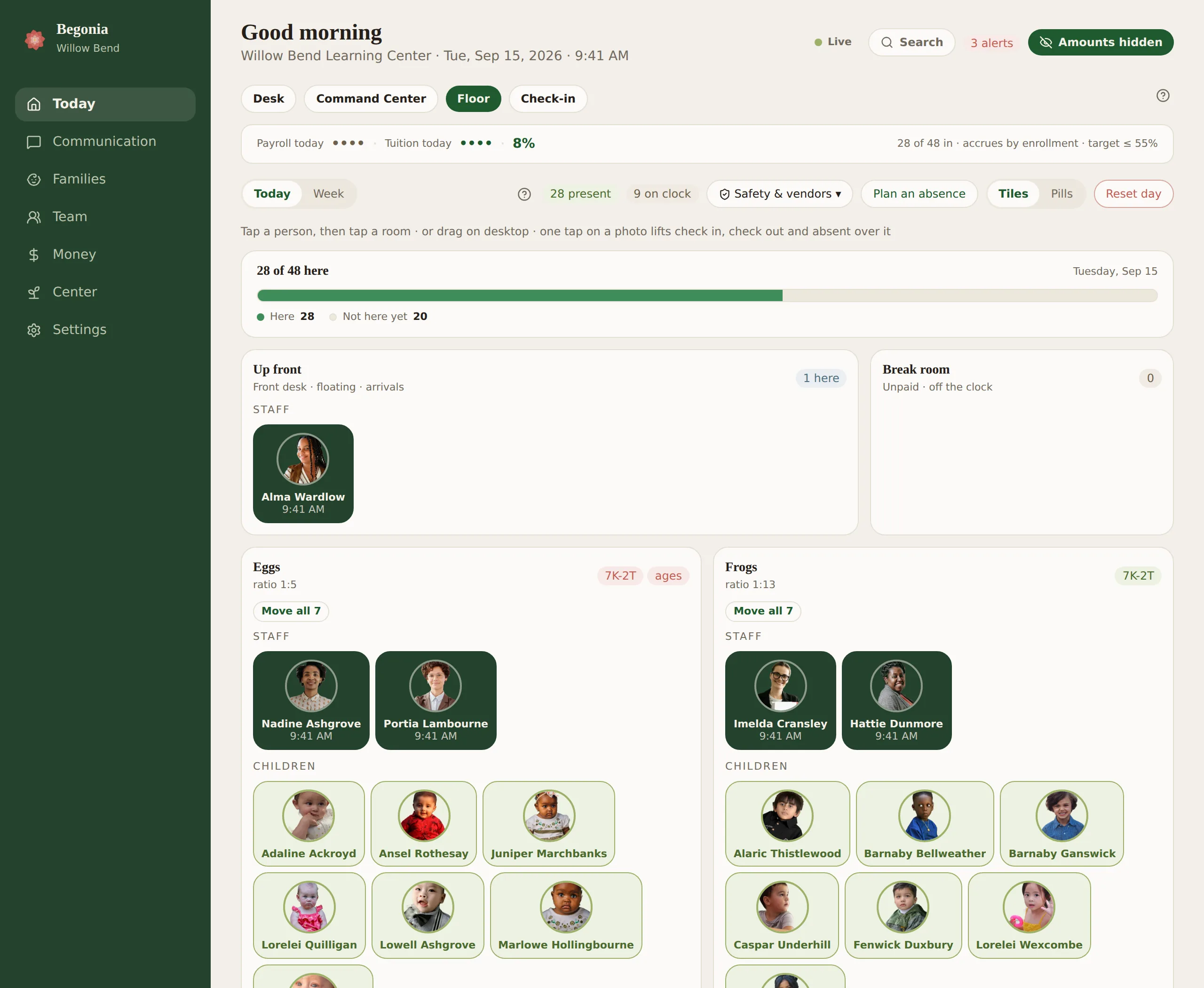
The floor is already laid out for the day. Today's schedule, today's menu, who is out sick, and which room opens first.
- 7:15
Drop-off begins
A parent signs in at the tablet. The allergy note and the approved pickup list are in front of the teacher before the coat is off. If your state expects a health check at the door, it is one tap per child, and the strip leaves the screen once the last child is accounted for.
- 9:38
A two year old goes up to the threes
She moves up next month, so she is spending mornings there this week. That room runs at one to ten while she is in it, and the floor says so before anyone has to work it out.
- 11:04
A new family calls
It records, transcribes, and lands in the enrollment pipeline with her number attached, so the follow-up happens on Thursday whether or not anyone remembers it.
- 1:30
Nap, and breaks
Coverage is built against the ratio this afternoon actually needs, rather than the one the schedule assumed back in March.
- 6:04
Last family out
Tuition ran this morning. The day's notes have gone home. Tomorrow's coverage is already checked, and the lights are the only thing left to turn off.
Drop-off is a code and a tap.
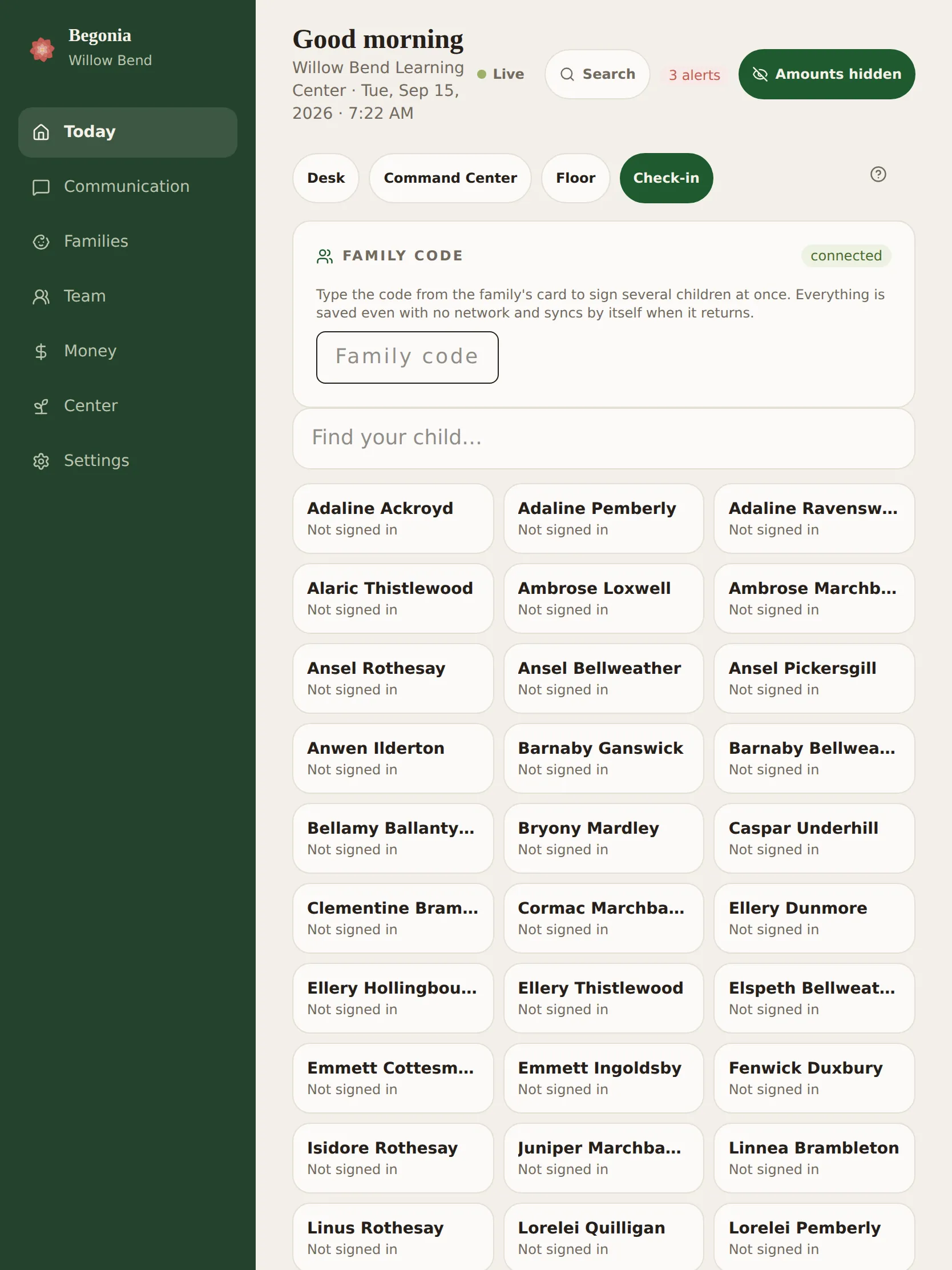
A family types the code from their card, or finds their child by name, and signs everyone in at once. The allergy note and the approved pickup list are in front of the teacher before the coat is off. If your state expects a health check at the door, it is one tap per child.
It keeps working with no network and syncs by itself when the network returns, because a router rebooting at 7:30 is not a reason for a line at the door. And the same tap is the attendance record, the ratio on the floor board and the hours on the timesheet, so a thing done once at the door is done everywhere.
Everything a center does, arranged the way a center thinks.
Not eleven modules and a settings maze. Six places, in the order a day happens, and everything lives behind the one you would have guessed.
Today
The morning on one screen. Your desk and its calendar, live ratios by room, who is on the floor, check-in at the front door, and the short list of things that need a person before lunch.
Communication
Everything the center says and everything it hears. Family messages, the center's real inbox and its texts, the phone line, newsletters, the family calendar and surveys. What came in overnight is read in the same breath as the morning.
Families
First enquiry to last day. Tours and the waitlist, enrollment paperwork, each child's file and photographs, daily notes, incidents, observations, the room a child moves up into, and a login of their own for every family.
Team
Your people and their paperwork. Schedules built against the ratios the day needs, breaks and nap coverage, the time clock, training and certificate expiry, background checks, the handbook, payroll inputs and hiring.
Money
Every dollar in one door. Tuition by card or bank draft, county subsidy, who you pay and what it cost, the bank feed and its statements, the books your accountant will accept, year-end statements, and full service banking behind all of it.
Center
The building and its machinery. Rooms and capacity, menus and the food program, the licensing binder, drills, transport, curriculum, insurance, and the public website families find you on.
Ratio follows the youngest child in the room, not the sign on the door.
Every center knows the rule. Almost no software applies it. Combine the twos and the threes at the end of the day, or let a child finish the week in her old room before she moves up, and that room stops being a threes room while she is in it.
On the enhanced ratios most rated centers actually run, a room of three year olds is one teacher to ten. The moment a two year old joins it, the whole room is one to nine. One child, and the teacher who was covering that room legally a second ago is now one short. Begonia recalculates as children move, not at the end of the shift and not when somebody remembers to drag a name across a screen.
It is the difference between a number that looks right and a number that is right.
Every dollar in one door, and full service banking behind it.
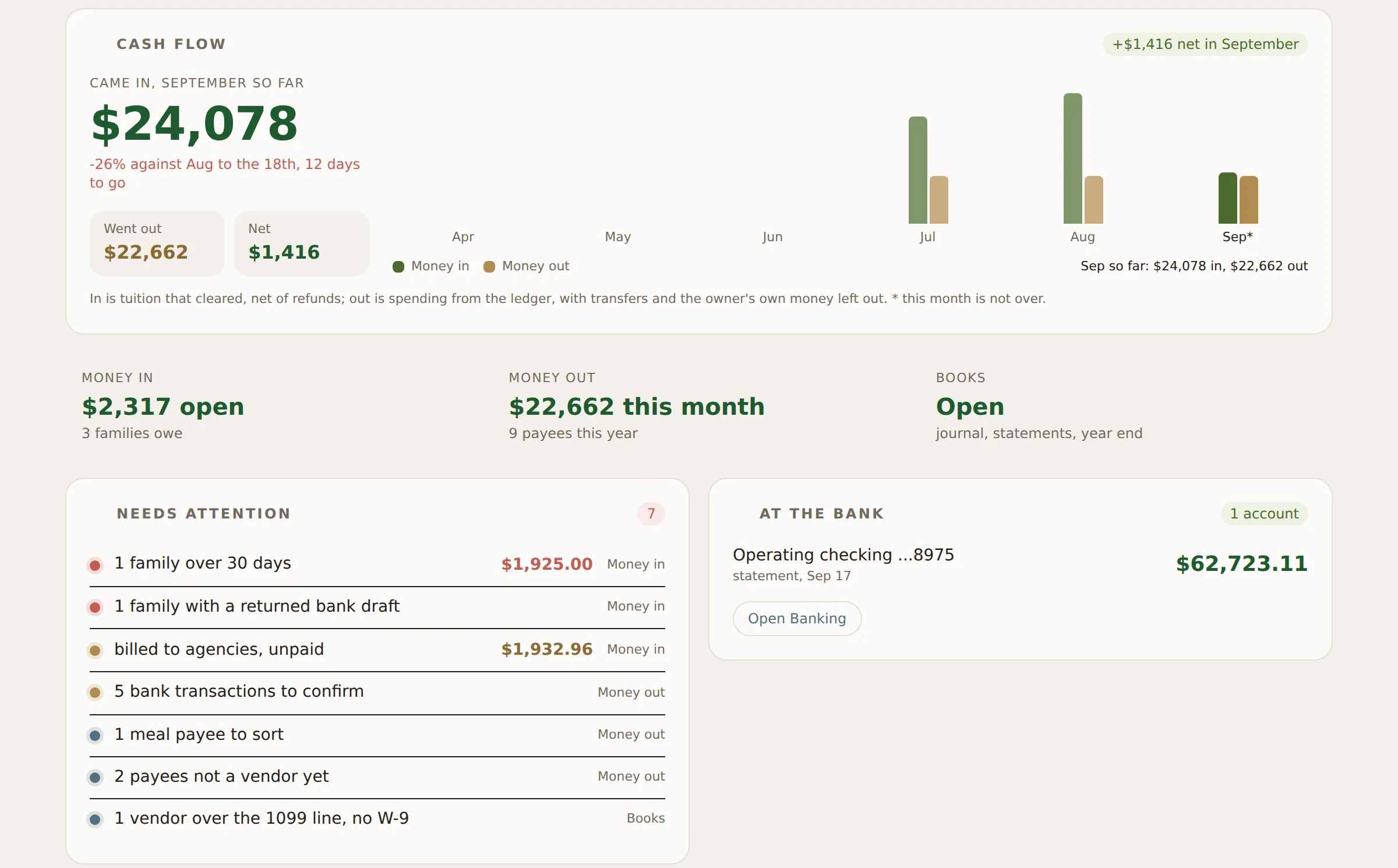
Six tabs, one question each: how is the money, who pays you, who you pay, the bank, the books, and the owner's own. Nothing on the overview is a modeled figure. Every number is read from the rows underneath it, and every line that needs a person lands on the card that settles it.
Tuition, the way the family pays
Card today, bank draft on the way. Autopay from the child's file, refunds against the original payment, returned drafts flagged the morning they come back, and a collections packet when a conversation has to become a letter. The family pays a small convenience fee per payment, shown to them before they pay it; the center is never charged a percentage and never debited for the gateway.
The bank, in the room
Connect the feed and every transaction lands beside the ledger entry it belongs to, waiting to be confirmed rather than retyped. Or drop the bank's own statement file on the page and the day's balance, credits and debits and every line are read in the browser, four digits of the account and nothing more. A bill you send by ACH is watched for on the feed until it lands.
Books your accountant will accept
A journal, reconciling against the bank, a budget against what actually happened, vendors with their 1099 standing and W-9s, payroll records, the Schedule C summary for the return, and a year-end statement for every family for theirs.
Full service banking opening
An operating account that tuition settles straight into, bills paid by ACH from it, debit cards for whoever buys things with a limit per card, automatic distributions above the floor you set, and payroll funded from the same account the tuition arrived in. The screens are built and sit on the Banking tab today; the account opens with a partner bank.
The work that keeps a center open, handled.
A center does not run on software for children. It runs on a payroll company, a bank, a card somebody has to reconcile, a bookkeeper, an insurance renewal, a curriculum and a food program. Begonia is where all of it lives, on one bill, in one login.
Billing that reconciles
Tuition, autopay, late fees, credits and a bank feed that matches deposits to families without you exporting anything.
Subsidy and vouchers
County paperwork, attendance evidence and the reporting, kept in the same place as the child it belongs to.
Compliance binder
Every training, physical, background check and policy signature, with expiry dates that raise their hand before an inspector does. Staff open their own file and fix it themselves, so a lapsed certificate is not a director's afternoon.
Year-end statements
Tax statements for every family, generated and sent, without the January phone queue.
Your phone number
Calls ring in the app, record, transcribe, and file themselves as an enquiry with the family attached.
Texts and email
The center's real inbox and its texts, in the software, so a conversation is not split across three devices.
Transport
Manifests that reconcile. Every child scanned on and scanned off, with an alarm that will not let the trip close until they are.
Menus and CACFP
Weekly menus that satisfy the meal pattern, with the claim paperwork falling out of what you already served.
Enrollment pipeline
Tour to waitlist to start date, with the follow-up that turns an enquiry on a Tuesday into a family in September.
Staff scheduling
Shifts built against the ratios the day actually needs, including breaks and nap coverage.
Incidents and notes
Written once, at the moment, on the floor. Not reconstructed at six o'clock from memory.
Your public website
A site families can find, with tour booking that writes straight into your pipeline.
Payroll that builds itself
Clock-ins on the floor become hours, hours become the run your payroll provider needs, and withholding is estimated before you approve a thing. Nobody retypes a timesheet.
A login for every family
Their child's day, photographs, the menu and the calendar, messages, incidents to sign, the handbook, documents, and the year-end statement, on their own phone.
A handbook that writes itself
The family handbook drafted from how the center is actually set up, checked against what your state expects it to say, and printed with your logo on it.
Video calls with families
A tour or a conference from the app, with a guest link that needs nothing installed and a classroom background blurred on the way out.
The bank feed and the statement
Balances, deposits and transfers sitting beside the ledger they belong to, so reconciling is a glance down the page instead of an export and a spreadsheet. The bank's own statement file drops straight onto the page.
Receipts, from wherever they arrive
A stack of receipts photographed in one go, a bill that arrived by email, a staff member's reimbursement request: each one becomes the ledger line it belongs to, with the picture attached.
Books your accountant will accept
Every transaction categorised the day it lands, so the year closes from what already happened instead of from a shoebox in February.
Curriculum and observations
Lesson plans built against your state's early learning standards, with observations written on the floor and attached to the child they describe.
Insurance that goes to bid
Liability, property, vehicles and workers' compensation, taken to market every renewal so carriers compete for your center instead of quietly raising you nine percent because nobody asked.
Drills, logged as you go
Fire, lockdown and severe weather on a schedule, with the date, the time taken and who was in the building recorded as the drill happens rather than reconstructed for an inspector afterwards.
Surveys families answer
Short questions sent to the families or the staff you choose, with the answers gathered where you can act on them instead of in a spreadsheet somebody has to build.
Where childcare software usually falls apart.
Six places, and they are the six that separate software which demos well from software that survives a Tuesday. Here is how each one actually works, and what it costs you once it is set up, so you can hold it against whatever else you are looking at before anyone gets on a call.
How do you handle a family paying part cash, part county subsidy?
One family, one ledger. The subsidy portion is its own line with the county's own rate and its own attendance evidence attached, and the parent's statement shows what the parent owes and nothing else. When the county pays late, the family does not see a past due balance for money they were never going to send you.
How do I file an incident report a parent has to sign?
The teacher writes it on the floor, on the tablet in her hand, at the moment it happened rather than reconstructed at six o'clock. It reaches the director for review before it reaches the family. The parent signs on their own phone at pickup or that evening, and the signed copy files itself into the child's record where a licensing visit can find it.
Do I have to re-key everything from my current system?
No. We bring your children, families, balances, documents and history across ourselves. You keep your existing system running until you are satisfied, rather than the other way around, and if the migration is not right you have lost nothing but our time. We do not hand you a spreadsheet template and wish you luck.
What is included, and what is going to cost extra later?
Everything is included at every plan. Every module, unlimited children and families, the parent app, messaging, the payment portal, payroll, banking and migration. Plans differ by one thing only, which is how many staff you employ, so nothing you are already using can move behind a higher one and there is no module you discover you need in March.
There is no per-parent charge either. Enrolling a family should be the best day of your month, not a line item that raises your bill.
What happens when a teacher calls out at 6am?
You see the day break before it breaks. The board shows which rooms fall out of ratio at which hour once she is off the schedule, who is already trained for that room, and who is under their hours this week. You are moving one person on purpose instead of finding out at 9:40 that the twos have been one teacher short for forty minutes.
My teachers hated the last system. Why is this different?
The floor screens were built to be worked with one hand while holding a child, because they were built by people holding children. Teachers here were not consulted politely in a survey, they were consulted loudly, in the hallway, the same day. If a screen is annoying it gets changed that week, and they know it, which is why they say so.
Built for the programs that actually raise children in this country.
Tell Begonia what kind of program you run and it changes shape. The floor, the enrollment, the money and the paperwork follow the kind of program, because a camp week and an infant room are not the same job with different words.
Child care centers
Rooms, ratios by the hour, the star rated license, CACFP, subsidy, tuition and the binder an inspector asks for. The shape everything else grew out of.
Family child care homes
One mixed-age group under a headcount rule, not rooms. Your own children count where the law counts them and stay out of the tuition and the food claim.
Multi-site operators
A license, an inspection history and a star per site, staff who work across sites, and books that consolidate without losing the site.
Before and after school
Enrollment by session, the school each child comes from, the district calendar with its early releases and workdays, and the bus roster that reconciles.
Camps and seasonal programs
Weeks and sessions with seats, a waitlist per week and billing per session, for a roster that empties and refills.
Head Start and Early Head Start
Funded slots instead of tuition, ERSEA selection kept private to management, attendance against 85 percent with the hour-after-opening call, home visits and conferences per child.
Church and faith-based programs
A Notice of Compliance instead of a star, so no rating is chased and no training tracker nags, while ratios, checks and inspections still apply.
Part-day preschools and Mother's Morning Out
Children on a pattern of days for a term, tuition by the number of days, who is expected today, and a carline at noon that the front and the classroom both see.
Drop-in and hourly care
A visit is the unit: in, out, minutes and money, with a minimum, a daily cap, punch cards and memberships.
Montessori schools
Mixed-age classrooms and a lesson record per child, presented to practicing to mastered, with the class view a guide plans the morning from.
Microschools and learning pods
Enrollment by term, a school-year calendar and learning records rather than daily sheets, without a compliance binder that assumes a license you do not hold.
Centers holding state pre-K seats
NC Pre-K, VPK or a county contract inside a tuition center: the seats, the program year, the lead teacher's credential and the monthly attendance report the funder wants.
Begonia is built inside a working North Carolina center, with children in the building, and tested every day by teachers who say so when a screen is wrong. The first program of each new kind on Begonia gets an unreasonable amount of our attention.
It is your center. It should be your data.
Switching childcare software is miserable on purpose almost everywhere. We decided not to build the trap.
Export everything, any day
Children, families, ledgers, documents, notes. In a normal format, without asking us, without a fee, and without a phone call designed to talk you out of it.
Your name in front of families
Your own address, your own logo, your own colours on everything a parent sees. Begonia is the platform you chose, not a second brand your families have to learn.
Leave without a hostage negotiation
Cancel monthly. We will hand over your records in full. If we ever stop earning your business we would rather know quickly.
Your locations, your names, one platform.
Groups and multi-site operators run Begonia across every center, with each site keeping its own identity in front of its own families. One agreement, one invoice, and a view across all of it that does not require opening six tabs.
- Every site, one screenEnrollment, ratios, staffing and revenue across the group, and any single center in one click.
- Roles built for an operations directorSee everything, edit what you should, with each center's data walled from the next unless you say otherwise.
- Each site stays its own placeLocations are not flattened into one account wearing a group name. Every center keeps its own address, phone number, staff, menus and calendar, so a family at one site is never sent another site's newsletter. Begonia is the platform underneath all of them, and it says so.
- Open a new site in an afternoonRooms, ratios, policies and forms copied from a center that already works, rather than built again from nothing.
- The same terms at ten sites as at oneMonth to month, whatever the size. This industry asks multi-site operators for an annual commitment precisely because leaving gets harder the more locations you have on it. That is the wrong reason for a contract to exist, so we do not have one.
One price per center. Not per child.
Enrolling a family should be the best day of your month, not a line item that raises your bill. Every plan includes every module, because a feature you have to buy twice was never really a feature.
Grove
Up to 15 staff
Quoted per center
Everything included, billed monthly
Ask what yours would beCanopy
Multi-room, unlimited staff
Quoted per center
Everything included, billed monthly
Ask what yours would beEvery plan includes all of it
The only thing that changes between plans is how many people you employ. Nothing on this list sits behind a higher one, and nothing moves up to a higher one later.
- Unlimited children and families
- Live ratios and the floor board
- Enrollment, tours and the waitlist
- The parent app, photos and daily reports
- Messaging, your inbox, texts and the phone line
- Tuition, autopay and the payment portal
- County subsidy and vouchers
- Payroll records, the bank feed and statements
- Full service banking, as it opens
- Bookkeeping and year-end statements
- Scheduling, time clock and compliance
- Menus, CACFP, transport and drills
- Curriculum, observations and surveys
- Your public website and tour booking
- Insurance taken to bid each renewal
- Migration from your current system
- Every future module, at no new price
No setup fee, no per-parent charge, and no annual contract. Cancel monthly and take your records with you. Begonia never bills your families directly, and what a family is charged stays your decision rather than ours.
And what it costs a family to pay you. Moving money carries a fee wherever you take it. The three questions worth asking anyone are who pays it, whether it is a flat amount or a percentage, and whether you can see it happen. Ours is paid by the family, per payment: a flat amount on a bank draft, a percentage on a card, both shown before they pay and set for your center rather than negotiated. The fee is its own line on the family's side, so the full tuition amount arrives in your account and your deposits reconcile against your invoices. Nothing is quietly netted out at the end of the month. Across one center that is a tidy statement. Across six it is the difference between books that balance and an afternoon spent finding out why they do not.
The questions directors actually ask.
What happens to my data if we leave?
You export it, in full, in a standard format, whenever you want, including on your way out. There is no fee and no waiting period. We would rather lose a center cleanly than keep one by making the door hard to find.
Do parents need to pay for anything?
Not to us. Begonia has no contract with your families and never bills them. The parent app, the photos, the daily report, messaging and the payment portal are part of what your center is already paying for, and there is no premium parent tier we sell behind your back to make a family feel second class for not buying it.
A family that pays by card or bank draft pays a small convenience fee per payment, set for your center and shown to them before they pay. A bank draft's fee is a flat amount and appears as its own line on their statement; a card's is a percentage. The center is never charged a percentage and never debited for the gateway, and we will tell you plainly what the fee earns us before you turn a rail on.
We are a single site. Is this too much?
Begonia is built in a single site and runs one today. Everything scales down as cleanly as it scales up, and you will not be paying for a multi-site console you never open.
Is our children's information safe?
Every record is protected at the database level, not just hidden in the interface, so what a person can see is decided by their role and enforced underneath the app rather than by it. Photographs and documents sit in private storage, and consent is respected everywhere a child's face could appear. The software we publish carries no children in it at all: the compiled records are stripped out of the public build, so what a browser downloads is the program and nothing else. The demo we send you goes further and answers its own network requests while it runs, which is why you can click anything inside it without reaching a real record. Demo links are issued to a named person, expire, and can be switched off from our side at any time.
Ask for a demo.
You get a link to a whole working center with invented children in it. Click anything, break a ratio on purpose, file an incident. Then a thirty-minute walkthrough on a real morning, with the ratios actually moving.
A person reads every one of these, usually the same day. The walkthrough is thirty minutes, no slide deck, and we will tell you if it is not a fit. Or call (980) 946-6222.